
Job management software for trade contractors
JobTread only handles
your projects.
Knowify handles your
whole operation.
Most trade contractors run more than projects. They run service calls, field crews, commercial billing, and QuickBooks — all at once. Knowify was built for that whole picture, not just the project management piece of it.
 Official QuickBooks Partner
Good project management isn't enough
if the rest of your business is stitched together.
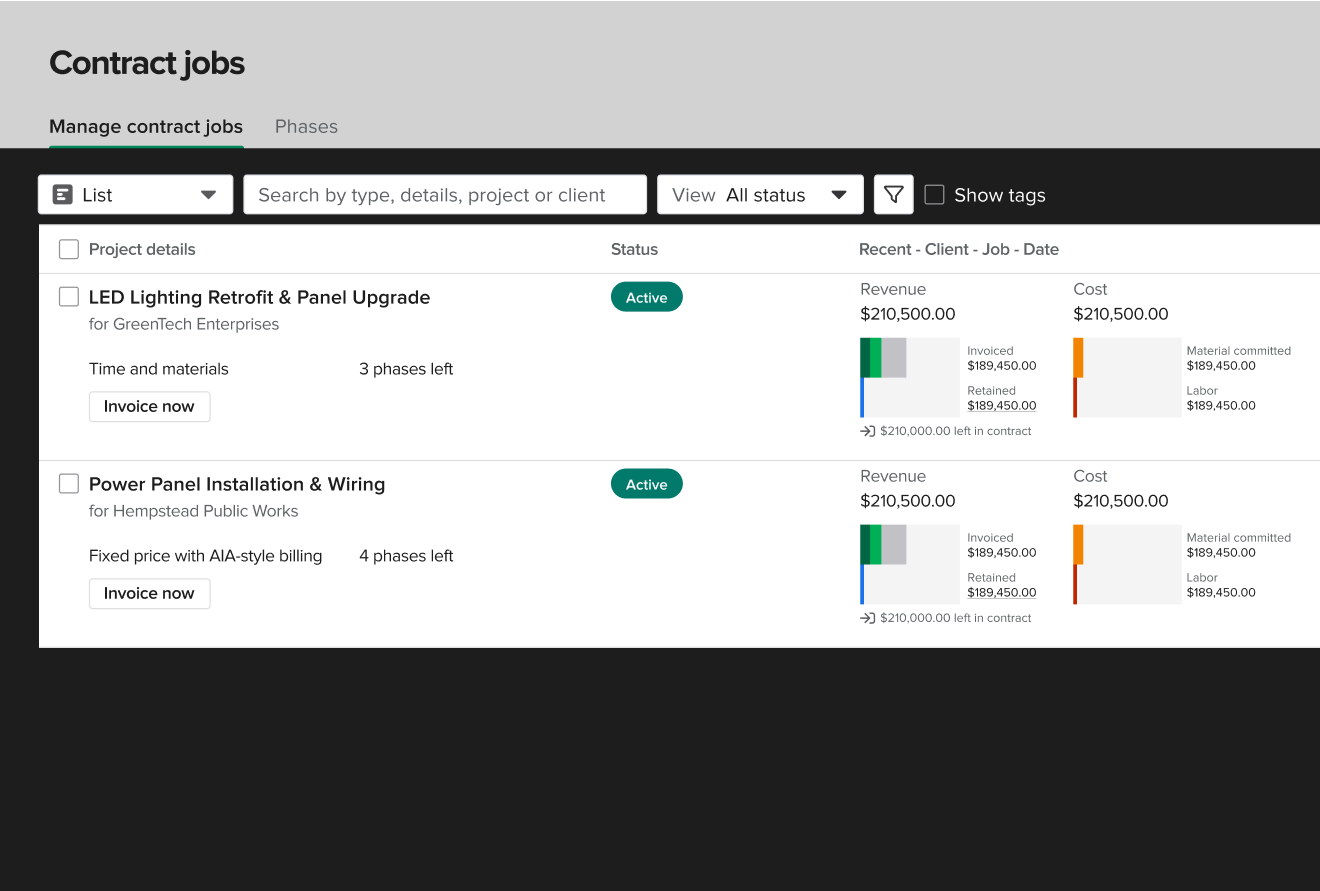
Good project tracking and estimating is table stakes. Where contractors run into trouble is everything around it — service calls that don't fit a project workflow, job costs that don't reflect what's actually happening in the field, and billing requirements that the tool wasn't built for. That's what Knowify was designed to handle.
Built for project-only contractors
- ✗Construction-only platform. If you run service calls alongside your jobs, you'll need a second tool.
- ~AIA billing available, though not via the AIA Contract Documents licensed form partnership.
- ✗Mobile experience is web-based rather than a dedicated native iOS or Android app.
- ✗No prevailing wage or certified payroll workflow available.
- ✗Job costing available; equipment costing depth for complex commercial work not confirmed.
- ✗No fleet telematics, GPS tracking, or tool tracking identified.
Built for trade contractors doing real work
- ✓Service dispatch and project management in one platform. One QBO sync. No second tool.
- ✓Actual licensed G702/G703 forms via the AIA Contract Documents partnership. GCs accept them first time.
- ✓Dedicated native iOS and Android apps. Your crew clocks in from the field, not a browser.
- ✓Prevailing wage and certified payroll via Lumber and eBacon integrations.
- ✓Equipment costing, phase-level job costing, and real-time budget vs. actual on every job.
- ✓Fleet telematics via FleetSharp — GPS tracking, AI dashcams, and tool tracking int the same system you use to manage your work.
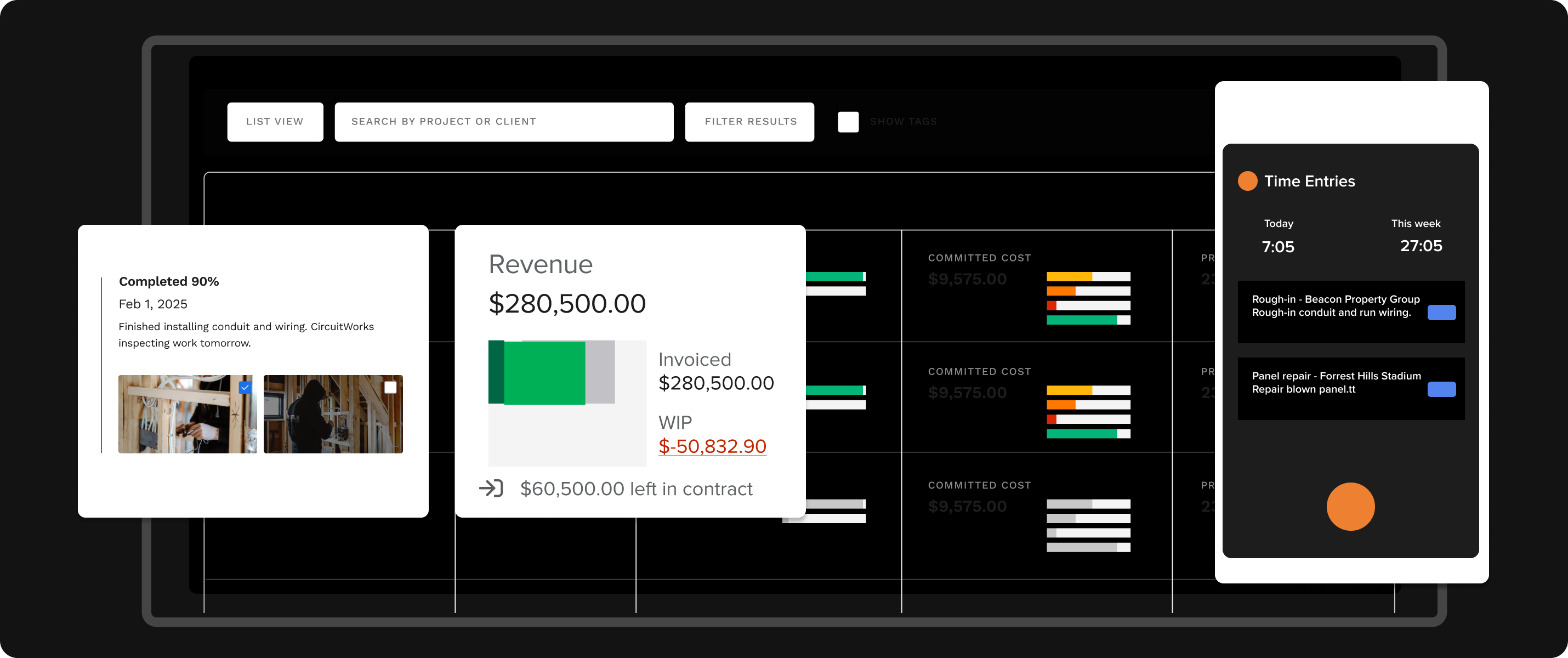
Know if this job is making money before it's done
Most contractors find out a job lost money after they send the invoice. By then it's too late to do anything about it. Knowify tracks every dollar — labor by phase, material costs, subcontractor spend, and equipment — against your budget in real time as the job progresses, so you can act before the damage is done.
- Real-time job costing: labor, materials, subs, and equipment vs. budget
- Phase-level cost breakdown — see where margin is slipping mid-job
- Equipment costing built in, not bolted on
- Daily logs from the field flow directly into job cost tracking
- Budget vs. actual in QBO automatically — no manual reconciliation
"No one had the list of features I needed, except Knowify. I need to be able to run one-day service jobs and projects that take up to a year."
— Owner, White Bros. Plumbing
Your service calls don't stop because you're running a project. Neither does Knowify.
Most trade contractors run both projects and service work. Keeping them in separate tools means a second platform, a second QuickBooks sync, and two sets of books to reconcile at month end. Knowify's Service Pro brings dispatch, work orders, recurring maintenance agreements, and mobile invoicing into the same platform as your project work. One system. One sync. No double entry.
- Real-time drag-and-drop dispatch board for service calls
- Work orders, mobile invoicing, and equipment service history
- Recurring maintenance agreements built in
- Service and project costs tracked together in job costing
Win government work without building a compliance headache
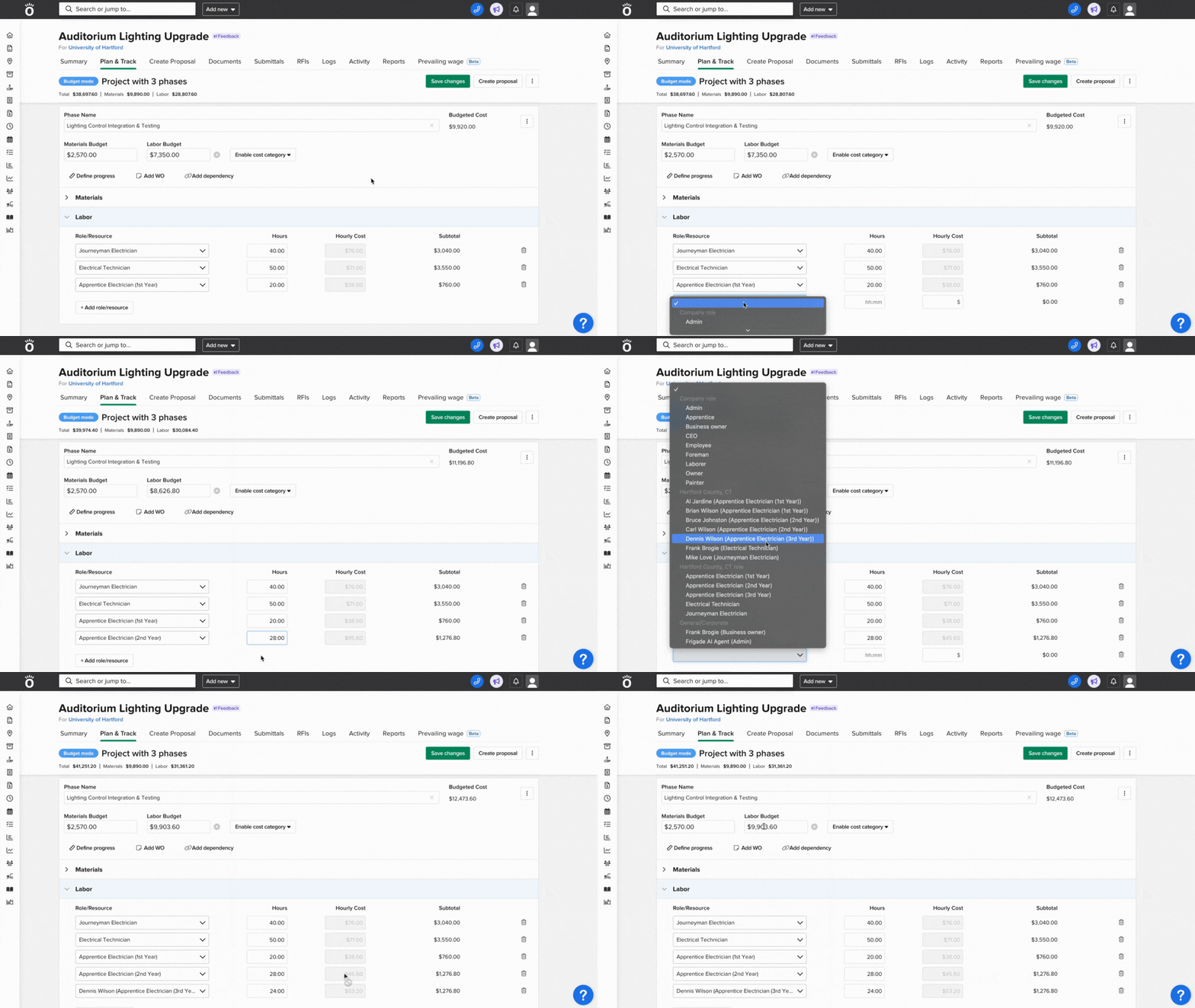
Most project management tools have no prevailing wage workflow. Win a Davis-Bacon job and you're tracking wage classifications in a spreadsheet, manually feeding a certified payroll system, and hoping the math is right. Knowify connects directly to Lumber and eBacon so the whole process runs as one system, from time entry on the job site through certified payroll submission.
- Time tracking by trade wage classification, built into the mobile app
- Certified payroll generation via Lumber and eBacon integrations
- WH-347 reports, fringe benefit trust support, Davis-Bacon compliance
- Prevailing wage labor burden tracked correctly in job costing
- One connected system from the field to certified payroll submission
Know where every truck, tool, and crew member is — and what they cost
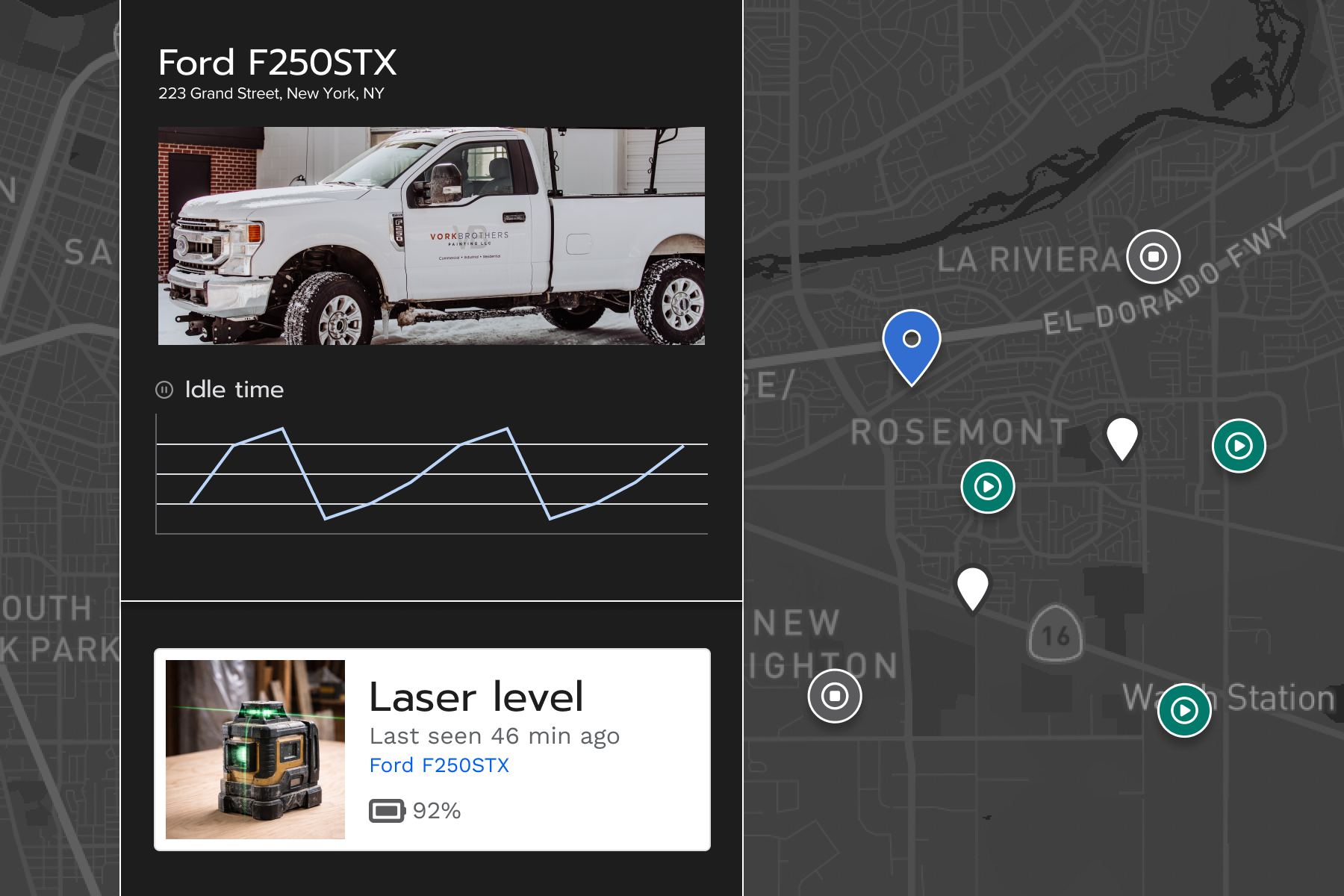
Equipment is one of the hardest cost categories to track accurately. Knowify's telematics add-on via FleetSharp connects GPS tracking, AI dashcams, and tool tracking directly to your job costing — so equipment costs land on the right job and the right phase automatically. No spreadsheet. No end-of-month reconciliation.
- Live GPS tracking for every vehicle in your fleet
- AI dashcams for driver safety and incident documentation
- Tool tracking so equipment doesn't walk off the job site
- Equipment costs flow directly into job costing by phase
- Fleet data and job data in one platform — not two separate systems
Ready to see it for yourself?
Book a 30-minute demo. A trade contractor specialist will walk you through the platform.
A native app for the field. Not a browser dressed up as one.
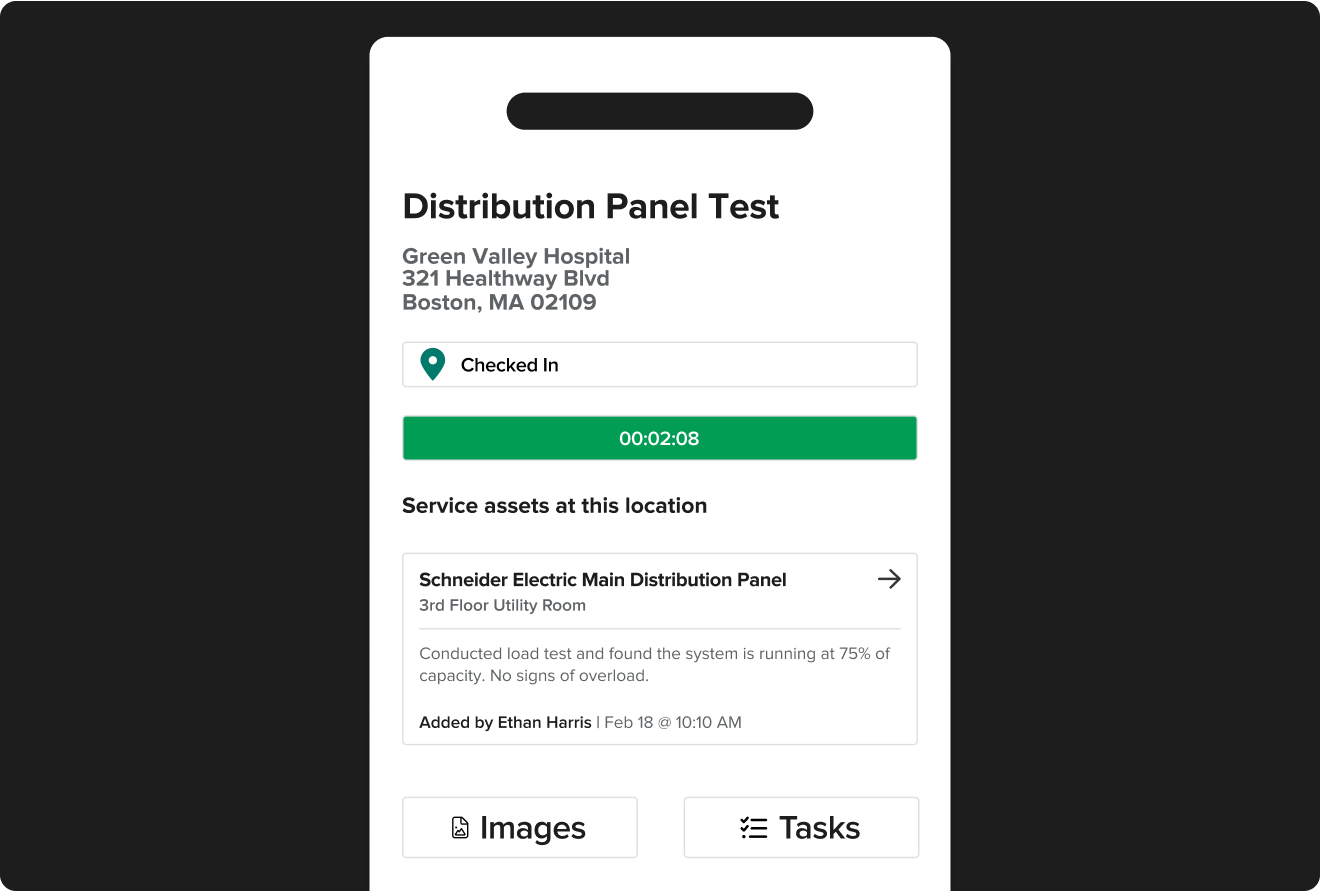
Knowify ships dedicated native iOS and Android apps built for crews that don't sit at a desk. Time tracking, daily logs, material requests, and service invoicing all work from the app — even on a spotty connection. Everything flows back to the office without a phone call.
- Native iOS and Android apps — no browser dependency
- Field time tracking tied directly to job costing by phase
- Mobile daily logs — weather, manpower, deliveries, safety
- Service asset history and work order completion on site
- Invoice from the field. Get paid before you leave the job.
How Knowify compares to JobTread
Based on Knowify's published feature set and publicly available information about JobTread as of May 2026. JobTread features may vary by plan — verify directly with JobTread.
| FeatureBased on Knowify published pricing & features | Knowifyknowify.com/pricing | JobTreadPublicly available information, May 2026 |
|---|---|---|
| Buying Experience | ||
| Published pricing | ✓ All plans at knowify.com/pricing. Comparable plan from $249/mo annual. | ✓ $199/mo base + $20/mo per team member — published at jobtread.com |
| Free trial | ✓ 14-day free trial, no credit card required | ✗ No free trial — sign up directly to start |
| Contract flexibility | ✓ Month-to-month or annual. No long-term lock-in. | ✓ Flexible plans available |
| Implementation fees | ✓ No implementation fees | ✓ No implementation fees |
| Project Management | ||
| Estimating & proposals | ✓ Fixed price, cost-plus, T&M, and AIA contract types | ✓ Strong estimating and proposal tools |
| Phase-based project structure | ✓ Multi-phase scheduling with cost categories per phase | ✓ Available |
| Change orders | ✓ Electronic creation, eSignature, auto budget impact | ✓ Available |
| Subcontractor management | ✓ Multi-line subcontracts with insurance and license tracking | ✓ Available |
| Daily logs | ✓ Weather, manpower, equipment, deliveries, safety | ✓ Available |
| Financial & Billing | ||
| Real-time job costing | ✓ Labor, materials, subs, and equipment vs. budget by phase | ~ Job costing available; equipment costing depth not confirmed |
| WIP reporting | ✓ Real-time WIP reporting included | ✓ Available |
| AIA G702/G703 pay applications | ✓ Licensed G702/G703 forms via AIA Contract Documents partnership | ~ AIA-style billing available. Not via AIA Contract Documents licensed form partnership. |
| Prevailing wage / certified payroll | ✓ Via Lumber and eBacon integrations (WH-347, fringe benefit trust) | ✗ Not identified as an available feature |
| Service Work | ||
| Service dispatch & scheduling | ✓ Real-time drag-and-drop dispatch board (Service Pro, $99/mo) | ✗ No service dispatch. Construction-only platform. |
| Recurring maintenance agreements | ✓ Included in Service Pro | ✗ Not available |
| Mobile service invoicing | ✓ Invoice from the field before leaving the job | ✗ No service work module |
| Mobile & Field | ||
| Native mobile app | ✓ Dedicated iOS and Android apps | ~ Web-based mobile experience, not a dedicated native app |
| Field time tracking | ✓ Tied directly to job costing by phase | ✓ Available |
| QuickBooks & Integrations | ||
| QuickBooks Online sync | ✓ Official QBO construction partner. Native two-way sync. | ✓ QBO integration available |
| QB Time, QB Payroll, QB Payments | ✓ All three sync natively as Intuit ecosystem partner | ~ Not confirmed as native integrations |
| Intuit Enterprise Suite (IES) | ✓ Native integration included | ~ Not confirmed |
| QuickBooks Desktop | ✓ Supported | ✗ Not supported |
| Support & Platform | ||
| US-based support team | ✓ US-based. Custom reports built free. | ✓ US-based support — well-regarded by customers |
| Fleet telematics | ✓ GPS tracking, AI dashcams, tool tracking (add-on via FleetSharp) | ✗ Not identified as an available feature |
✓ = Confirmed available · ✗ = Not available or not offered · ~ = Partially available or status unconfirmed
Comparison based on publicly available information as of May 2026. Features subject to change. Verify current capabilities directly with JobTread before making a purchasing decision.
Transparent pricing.
No per-user surprises.
Both platforms publish their pricing. The difference is how it scales. JobTread charges per team member on top of the base — every person you add costs more. Knowify's Advanced plan is a flat rate with no per-user fees.
JobTread
$199per month + $20/mo per team member · 20% off annual
- Per-user fees — every person you add increases your monthly bill
- No contract required — monthly or annual available
- No setup fees — implementation and training included
- No free trial — sign up directly to begin
- 30-day money-back guarantee on monthly subscriptions
Knowify
$249per month, billed annually · Advanced plan · flat rate, no per-user fees
- Flat monthly rate — add your whole team without watching the bill climb
- Month-to-month or annual. No long-term contract required.
- 14-day free trial. No credit card required.
- All pricing at knowify.com. No sales call needed.
- Core from $149/mo · Service Pro add-on $99/mo if you run service work
JobTread pricing based on published rates as of May 2026. Verify current pricing at jobtread.com before making a purchasing decision.
Straight from trade contractors
"Knowify Has Helped Us Scale 300% over the Last 5 Years. The QuickBooks connection is precious — it is well integrated."
Long-term customer · G2 Review
"What keeps us at Knowify — invoices with option to have detailed SOV. I didn't see anything like this at any other software."
Julia K. · Accounting & Payroll Admin
"It has really helped us to organize as a team to get us all on the same page with all our projects."
Verified reviewer · G2
Things JobTread evaluators ask us
"We've heard good things about JobTread. Why should we look at Knowify?"
It's a well-regarded tool for project management and estimating — that reputation is earned. But if you run service calls alongside your projects, need licensed G702/G703 pay apps, or want field-to-office job costing with equipment costing built in, Knowify was built specifically for that combination.
"JobTread offers AIA billing now — isn't that good enough?"
There's a difference between AIA-style billing and actual licensed G702/G703 forms generated through the AIA Contract Documents partnership. GCs and owners increasingly require the licensed documents. Knowify is the only platform in this price range that generates them through a direct AIA Contract Documents partnership.
"We don't do service work — does Knowify still make sense?"
Yes. The job costing depth, native QBO integration, and real AIA billing stand on their own for construction-only contractors. And most contractors who come in through project work find they add service work over time — Knowify handles both when you're ready, without switching platforms.
"How does the QuickBooks integration compare?"
Knowify is the official QuickBooks Online construction software partner — a native integration with QB Time, QB Payroll, QB Payments, QuickBooks Desktop, and Intuit Enterprise Suite all syncing natively. Partner-level depth with the full Intuit ecosystem is specific to Knowify.
"We have crews in the field — will they actually use it?"
Knowify ships dedicated native iOS and Android apps. Time tracking, daily logs, material requests, and invoicing all work from the app without a browser. The difference matters when crews are in the field on a spotty connection or moving between jobs quickly.
"Is Knowify really month-to-month?"
Yes. No annual contract required on any plan. Month-to-month across the board. All pricing published at knowify.com. We built it that way because we want you to stay for the right reason: it works, not because you're locked in.
See why trade contractors choose Knowify over JobTread
Book a 30-minute demo with a trade contractor specialist. We'll show you job costing, pay applications, and service dispatch — and how it all connects to QuickBooks.
- See real-time job costing by phase — labor, materials, subs, equipment vs. budget
- See how pay applications are generated directly from your project billing
- Watch a service call dispatched, completed, and invoiced end-to-end
- Get a side-by-side comparison with your current stack and pricing