Get an inside look at one of the most-used features in Knowify: AIA-style invoicing. Whether you’re already using AIA pay applications or you’re just getting started, this deep-dive webinar breaks down exactly how to set up, generate, and manage complex contract billing with confidence. Led by our Head of Customer Experience, Terrin Kalian, who brings 10+ years of hands-on Knowify expertise, you’ll get practical guidance and real-world tips to streamline your billing.
If you’re ready to master AIA forms, manage retainage with ease, and keep your billing on track with QuickBooks integration, this session is for you. Walk away with actionable know-how and a clearer understanding of how Knowify can simplify your AIA pay app process.
Key learning outcomes:
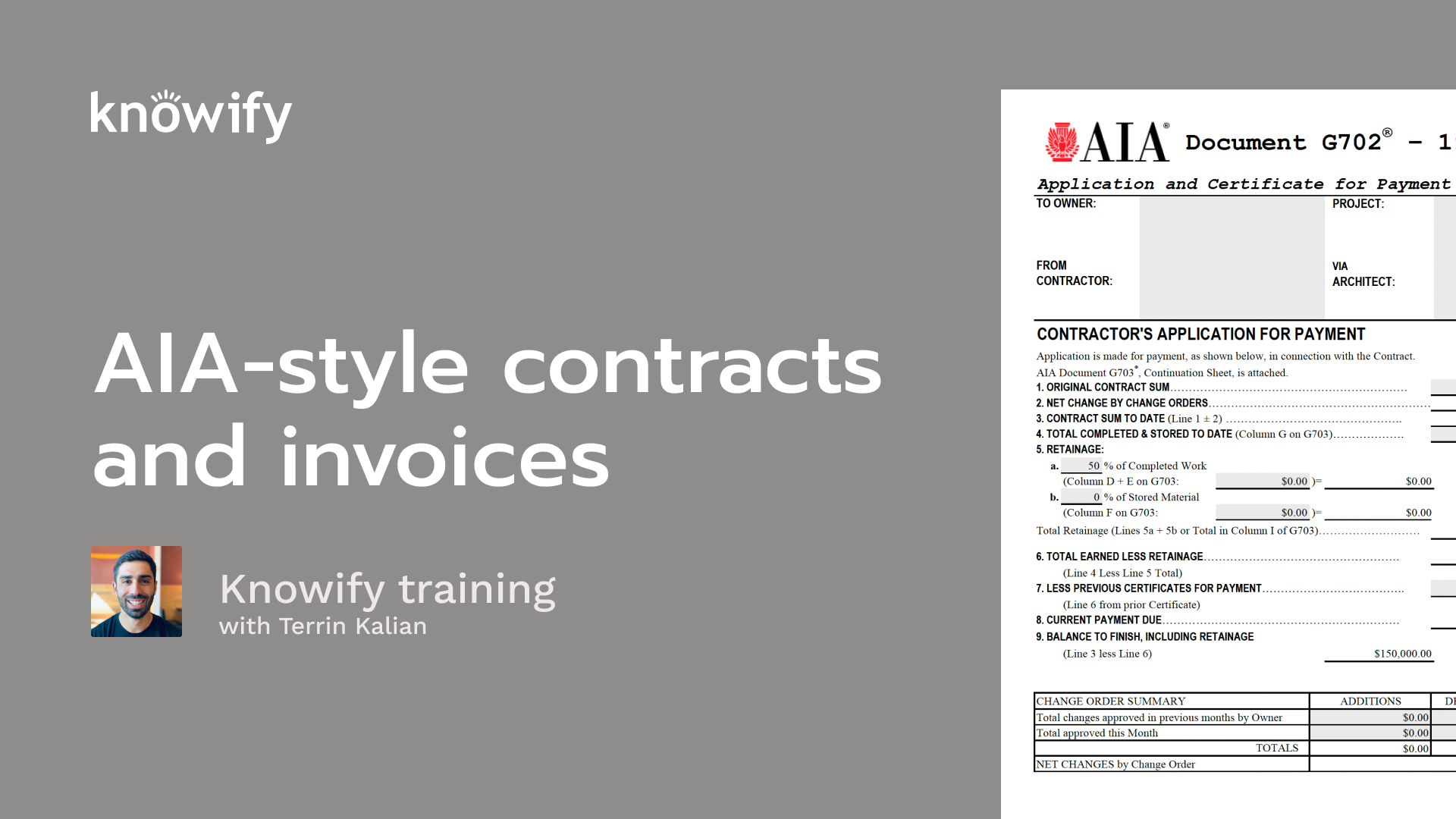
Welcome in, everyone, and thank you for joining us today. Today on our deep dive webinar, we are going over what is what is probably one of the most popular topics in nullify, which is AIA style invoicing. If you are familiar with this style of invoice, you understand why having software to help you with it is a a huge help. It's a big time saver. It could definitely ease some stress around billing time. And if you're new to this, I am gonna do a pretty deep dive on not just how to do this in nullify, but just some of the fields in general and kind of, how they're expected to be used because it's, pretty common for people to come to nullify knowing they need AIA invoicing. But if you haven't done it in the past, the forms can look kinda daunting. So, hopefully, I can shed a little light on all of this and make it seem a little bit easier when you have to do these buildings again in the future. As always, I'll start by introducing myself. My name is Taryn, and I have been at Knowlify for a little over ten, nearly eleven years now. And my job as head of customer experience is just to make sure that you guys are as happy as possible with Novify, as a software, as a company. And so, that's a big reason why we do these webinars is just to make sure you're getting the most use out of your subscription, in the software itself. I wanna make sure that you're trained up. You have all the answers to all your questions. That's where these deep dives really come from. To quickly cover our agenda, I always like to start with some slides to, basically introduce the different topics and explain a little bit more backing of information before we jump right into the demonstration. So I'll be talking about what is AIA invoicing, setting these things up in Noify, both in the contract level and the invoice level, and then, going into some detail on the, more specific, sets of knowledge involved in AIA invoicing, which is gonna be our retainage, as well as completed work and stored materials. Once I go through my slide deck, I will pull up my Noify account, just kinda walk you through all the different things that we can actually handle inside Noify, and, hopefully, teach you a couple of tips and tricks that can make this a little bit easier for you when you have these, in the future. All that being said, I'll go ahead and get us kicked off with what is AIA style invoicing. So, one thing I'll say right off the bat, it is AIA. We do hear a lot of a one a because it's always abbreviated like that. The AIA here, stands for American Institute of Architects, and the invoicing that we're discussing is essentially a way for you to, provide your customer with more information than pay me this much. There's two different forms that are involved. So there's a g seven zero two, which is the cover sheet. This is our way of saying, here's, the balance of the total contract, how much we've invoiced in the past, and how much we're invoicing now, how much we, are saying you owe us. And then there's the g seven zero three, which is our continuation sheet. You'll also hear that call to schedule values, which breaks down all that information into detail, not just totals of the contract, but, balances of individual lines of the contract and things like that. You'll hear a lot of the times people refer to these, types of invoices as pay applications. You know, one could argue that any invoice is an application for payment. You're sending out a document saying, hey. Please pay me this amount. But with the AIA style invoice, it really is a way of saying, here's what I'm communicating to you. You owe me based off of the work I've completed, based off the materials I need to buy, things like that. And so you're really applying to say, hey. As if this looks correct to you, please pay me the balance of this invoice. AIA invoicing also often comes along with, the concept of retention, which we'll be covering, in a couple slides and, of course, through the demonstration. But this is also where we get into the concept of things like, hey. Every time, we pay you, we're actually gonna give you ninety percent of what you are earning and holding on to that ten percent until we've confirmed that you've done a good job. And then that's our little insurance policy. And so if you have a customer that, needs to hold retention, we can manage all of that in nullify to make sure that we can see your outstanding balances while still going through a normal invoicing flow, not having to do too much manual math through the process. Now when we build a AIA job in Noify, the process of building the contract itself is very similar to what you'll get with your standard fixed price. And if you had attended our webinar a couple weeks back, when we go through our standard fixed price, it's pretty straightforward. We're just saying, here's how much we charge for each line that you asked us to do. So if I need to do demo, here's my price for demo. For framing, here's my price for framing and all of these things. There are a couple additional fields that end up being, applied with our AIA style contracts. This is gonna be things like the GC's request for proposal number, something that a lot of general contractors or other customers you work with will ask you to put alongside the, proposal document so that they know which, job you're bidding on. They may be, requesting bids from tons of different contractors for tons of different projects. So this is where you're saying, their way of saying, hey. When you send the proposal, specify which project this is for. Maybe you're bidding on multiple things with, my company. Maybe I just need more organization to get these things into the system, things like that just to make sure that everything's, again, more organized. AIA contracts in NoFi will also have retention that can be applied in a percentage on each project, and we'll cover how that's set up when this once the job's live. And then you'll also be able to set the GC's contract number and contract date and stuff in case that needs to be, included on the contract itself and also so it can be displayed on the AIA style invoices that you generate in nullify. Now when we're building an AIA style invoice document in nullify, The first thing it's gonna prompt to is our period two date. I always like to kinda specify what we mean by period two here. Because a lot of the times when you are invoicing, the invoice covers a specific period of time that might be that might not be the date that you're sending the invoice. So a good example would be if I'm sending an invoice today on January twentieth for all of the work I completed through the end of twenty twenty five, then I could say this is the period to December thirty first two thousand twenty five. So if you look at this invoice document and it doesn't line up with exactly what you see on the, actual job site. If it says that, on the invoice, we're fifty percent complete, but if you're looking at it on the job and you see we're seventy five percent complete, that's totally normal. Today's date may be the twentieth, but this invoice covers everything through the thirty first of last month. And that's kind of the relevance of our period to date. In theory, you can also forward date this. So if you know, of what is gonna be completed by a future date, we've seen that happen from time to time. It's not as common, but it is possible to do with nullify. Then when you're creating the invoice, it's also gonna prompt you for a style of how you wanna enter all of the data. And so what I mean by that is instead of just invoicing in percentages or in just dollar figures, you can actually specify. We put our percentage of completed work in as a percentage, but all of our stored materials is a dollar figure. We do both of them in dollar figures, or, the simplest option that we have is, essentially just the here's to how much I know you owe me. Let me just key in a dollar figure of I wanna invoice this amount on this line in this period. Not on the slide, but somewhat relevant. It comes up from time to time is unit based AIA. We have a solution for that as well that basically just displays not just a percentage, but, hey. In the schedule values, we told you there was a thousand units. Here's the number of units that we've completed, up until this period to date. And then as you invoice, since you set the retainage in a previous screen, you'll actually have the ability to, let know if I automatically calculate this as you go. So instead of us manually entering retainage on each invoice document, nullify would just keep a keep a track of that automatically removed from the final total payment due. And then at the end, you'll be able to create that retention invoice, when everything else has been completed. Now when it comes to managing retention, the first thing we'll do, is in the contract, set our percentage. So, it's, ten percent retainage on a project. This basically means that if I send a hundred dollar invoice, then that invoice is actually a ninety dollar invoice, and then ten dollars is retained until the, completion of the job. And there's a lot of different rules that we could support, just about every case in Noify where maybe retainage is partially invoiced partway through the job. Maybe it's completely released partway through the job. Maybe retainage percentage decreases, but we continue to have retainage through the life of the job. The way that the customer decides to release retention is completely up to them and part of their negotiation tactics a lot of the time. And so you can basically change how your retainage is managed on a job and nullify through the life cycle to make sure that everything is tracked and you know exactly what the outstanding balance is. In the normal happy flow, though, if you have just a simple something like ten percent retainage until the job's done, then once you've invoiced one hundred percent of every line less retention, then the next time you create an invoice in Noify, it's gonna say, here's everything they owe you in retainage, and it creates its own separate document to balance out the amount of the contract that we were what that we have agreed on with our client. It will balance that all out with the amount that we've invoiced the client for. When invoicing retainage, if you're working with QuickBooks, I also like to mention as well, we can sync the retainage to QuickBooks as a journal entry, which could be handy. That way, you can actually actually see, what has been earned but not invoiced yet. And then when you invoice retainage, the integration will automatically remove that from QuickBooks as well, reverse the number and the balance of the book so that everything is all, hunky dory in your accounting as well. And the last thing I like to cover in my slides is this idea of completed work versus stored materials, which is part of the phrasing of our AIA style invoice, specifically on the continuation sheet. I always like to spend a little extra time explaining what these two things mean because the the way they're phrased can often be confusing. And so the clarification is essentially that completed work and store materials doesn't mean how much I'm invoicing in labor versus how much I'm invoicing in materials. What these are meant to do is communicate how much work you've completed on a project and how much work you have preinvoiced before doing the job. So completed work, rather than saying, this is a way of telling the customer how much they owe me, This is a way for you to tell the customer how much work has been done on a job. So if I look at this screenshot below, work completed this period twenty five hundred dollars, previously twenty five hundred dollars, that's roughly half. I'm not saying you owe me twenty five hundred dollars. I'm just saying that I did twenty five hundred dollars worth of work in this period. And that's often confusing. Right? Like, how am I going to be explaining that I did the work without requesting the money? Well, that's actually where material stored comes into, play. Stored materials isn't necessarily, invoicing materials. It's called stored materials because it's the idea of, hey. I need to buy the materials in order to start the work, but I need the money up front so I can afford the materials. So maybe it's not afford, but, like, just to make sure that we're keeping ourselves as liquid as possible. So it's a way to basically say, I'm asking for money, but don't go look at the job site and see that I build ten percent of this line item and think that I'm ten percent complete. I'm just telling you that, hey. This is stored material. This is materials that I am asking you for the money for, but I am not telling you I completed the work. Now through the life of the job, that money's gonna move from stored materials into completed work, but that doesn't necessarily mean that you're asking for money. You're just moving the money across. You're saying, I know I invoiced material stored a thousand dollars previously. I'm invoicing a thousand dollars work completed now. There's no longer anything stored. I'm just communicating work that I completed. Don't worry about it. You paid me earlier. It's all documented in all of our, invoices if you look back at the previous pay applications. This is another benefit of having that period to date on our invoices is that each one tells a story of where we stood at a certain point in time. So I could say, as of invoice one, here was how much that was stored but not completed. As of invoice two, here's how much was completed and the remaining amount stored. And we can kinda just see the life cycle of how this project went through the dates and, were completed on each invoice to know where we stood at any point in time. So let me go ahead and pull up my Noify account, create a new project, and I will use this fixed price with AIA style billing. Now before I actually go into this, this is something I always forget to show in the demo, and I wanna make sure I clarify. So if you don't see this in your account, you can always go to the admin section to customize and make sure that AIA style, invoicing is enabled. You can also default to if you invoice in percentage, in dollars, or if you don't even use store materials, and you can also enable unit based pay applications here as well. Now we know this is enabled. I'll add a new contract job, choose my client, and choose this fixed price with AIA style invoicing. Now I'm actually gonna switch to a simple mode job. I don't need to budget here. And you'll see that we're creating a bid. We're putting together our quote that we're sending to the customer, our bid that we're sending to the GC, with their request for proposal number, my expected start and end date, all of this good stuff, just like any other contract we build in nullify. And I can start building out my contract here where I could say, I'm gonna use the copy from spreadsheet because I'm lazy, but I'm gonna drop in three lines. Okay. I'm telling the customer that we could do this job for eight thousand seven hundred fifty dollars. As we always can, we have the ability to do things like include additional details here, break, include a breakdown of, what goes into each of these items for more detailed pricing. This could be sent out for a digital esignature as well or, of course, download it and send outside of Notify. And I'm gonna go ahead and make this active. Once the job is live, you'll see there's these additional fields at the top where I could say, here's my GC's contract number, here's their contract date, and I'm gonna start with ten percent retention. Now before I get into invoicing, something I like to always display is that we have our schedule values, and in the case here, it matches what I quoted. But what can happen from time to time is I might do something like quote a lump sum, but then the customer gives me a list of line items that they want me to invoice because maybe my schedule values is a small piece of their corresponding schedule values that they invoice their customer for. But, essentially, to simplify this, they're just dictating how I can invoice them and what each of these lines looks like. So we have this ability to take this eighty seven fifty contract and say edit and say the customer told me that for demo, I'm actually invoicing four thousand. For rough in, I'm actually invoicing two thousand. For finish, I'm invoicing seventeen fifty. And then there is a final line called detailing, which is gonna be an extra thousand dollars, and this is how they break down their schedule values. Then we can also see here is the, original bid sum and then the current contract value. So we could see that separated. So it may not necessarily, be the exact same lines that we quoted when we set up this project, but the totals add up, and now this is matching more what our customer wants to see. I also can click this view original bid to see what I initially had quoted, but now this is the schedule values that I'll be invoicing. Similarly, I can add change orders. So if I wanna say, you can installation. I think I have something better for, like, upgraded can light. No. Oh, well. I'll say upgraded lighting selection for an extra twelve hundred dollars. This will be invoiceable as well, and we'll get into that in just a moment now when we get to the invoice important. So now my contract's good to go. I wanna set up, my first invoice. I'm gonna hit this invoice now button. This is where notified prompts me. Enter the last date of this billing period. So I'm billing for everything done through the month of December, and here's our default layout. Enter in a percentage, of completed work and a dollar figure for stored materials. This is the most common way just because work completed is easy to communicate in a percentage basis, so I could say I'm halfway done with this. And then stored materials, since it's more like a deposit type of transaction is a way of saying, hey. Can you just give me a thousand dollars before I start here? Now what's important to note is with this four thousand dollars fifty percent completed, two thousand dollars, one thousand percent stored, I'm technically invoicing fifty percent of either of these lines, but I'm not communicating that I'm fifty percent done with the rough in. I'm just asking for money upfront. Now when I preview this, nullify is gonna create our style of AIA, g seven zero two, which is our, cover sheet. It breaks down the original contract sum, the total amount that we're invoicing for, the amount that's being retained, the amount invoiced previously, in this case, none, and how much we ask for today. Then it also is gonna generate our continuation sheet, which breaks down our schedule values and how much we're invoicing out of each line. Now I'm gonna go ahead and finalize this. And because AIA invoicing is all about telling the story in a series of invoices, I'm gonna create my next invoice on this job. Now we'll say this is for everything we completed through the month of January. I'm gonna switch demolition from fifty percent complete to one hundred percent complete, and then I'm gonna take my stored materials on, rough in and then say we're no longer storing anything, and our rough in is now fifty percent complete. Now in fact, before you even get to updating our demo, let's say we're still fifty percent complete with demo. I did just move from store materials to completed work. And so if I preview my PDF here, here's kinda the interesting thing. I'm requesting zero dollars of payment, but I am communicating in this period a thousand dollars of work has been completed. This is the idea is that I'm not necessarily asking for a thousand dollars here because this is the common mistake. People will say, okay. Grand total work completed this period, a thousand dollars, and try to compare it to this. But what this isn't showing is that I had a thousand dollars that was already invoiced and stored previously. Now I'm just moving it into work completed this period. So now I'm gonna go in, finish creating the invoice, one hundred percent here. We'll go ahead and do our quick preview, and we have this breakdown. So the contract's for eight thousand seven hundred and fifty dollars, although there has been twelve hundred dollars of change orders so far. So the new total is, nine thousand nine hundred and fifty. The total of that value that I'm invoicing to date is five thousand dollars. Five hundred dollars of that is ten percent retention that I'm not owed yet because the, work has not been completed on the job. We haven't finished the work. And then, that comes out to forty five hundred total earned on this project. In the past, we invoiced twenty seven hundred. So here's what I'm saying you owe me today. What that means is by the end of the project, you're gonna owe me five thousand four hundred and fifty more dollars, to close everything out. And that's just kinda how this cover sheet works and breaks everything down. Then if I go to my continuation sheet, again, I could see work completed previously two thousand. This period, two thousand. This is a hundred percent complete. Rough in, nothing was completed previously. Now I'm invoicing a thousand dollars, but we're not actually asking for a thousand dollars. We just moved it over from material stored. I'll go ahead and finalize this as well. And now we'll be able to continue our invoicing and get into some of our fancier flows that are relevant to AIA style invoicing. So I'll say invoice now, and we are now completing everything through the month of February. A couple things of note here. Number one is I have this feature. It used to be called free mode. Now it says waive progress invoicing restrictions. What this is handy for is anytime I need to go outside of the normal flow of nullify calculating everything on my AIA style invoice so I can, put in my own information. So that means things like I wanna override the payout number. I know this is my third payout, but I need to call this number six. That's common for situations where maybe we're new to Noify, and I wanna invoice, moving forward, but I've done three payouts to date, then I could come in and call this payout number four. What we also can do is make manual adjustments to our retention either on an overall job level or on a line by line level. So let's just say, in theory, the customer said, we are gonna pay you back the retention on each line as you complete it. I can change the retention here to zero dollars. And even though I'm not changing any of the other balances, when I try to finalize this invoice, it's gonna say payment due four hundred, retainage less four hundred. The calculator icon will always go back to nullify's default calculation, but this is where we have the power to override things if we need so that if I have specific workflows, based off of what my customer's demanding, I can actually make these adjustments to, how much is retained, on each line. Free mode is also gonna allow us to do things like invoice above one hundred percent for when that's relevant. Whereas if we're not in, this wave progress invoicing restriction setup, know if I will block us from going outside the flow. And a lot of people ask, well, if this is gonna give me more functionality, then why would I ever not use this? And the reality is you can use it as much as you want, but the whole benefit of using Novi is if I get sloppy and say fifty percent complete and fifteen hundred stored, we have something to protect us and say, hey. You told us that this scheduled value was for two thousand dollars. You're trying to invoice more than that so we can kind of catch me and say, like, oops. You are correct. This is supposed to be a thousand dollars, and then that takes the warning away. So Notify is really doing its best to warn you, keep you inside the lines, keep everything organized, and keep the you from making mistakes. And as soon as you waive those restrictions, you're basically saying, I might make a mistake, but that's me making the mistake. I understand that nullify can't continue to do the math as soon as we stray from the normal invoicing workflows. The other checkbox here is use forms with AIA logo, and this is a a commonly asked about thing as well. You'll see that the default invoice document we generate in, the AIA style has all the same, detail and information, but it doesn't actually have the AIA branding on it. When we click this box, you'll get a notification saying, hey. You're gonna be charged twenty nine ninety eight per each application, and now it's gonna come out in this different style instead. That twenty nine ninety eight fee that you see is just because we have to pay the AIA for every certified document. One older traditional thing is that they'll sell you a blank one of these for whatever it's gonna be, thirty, forty dollars, and then you fill it out by hand. This is the equivalent of that, and that's why there has to be a fee affiliated with it. And it'll just be billed to your account monthly. Here are all of the AIA pay applications, with the official logo that you generated. But it'll still keep track. All of the information works the exact same way. It just uses this official document, if that's required by your customer. In the majority of cases, we see that it's not required, but you do have this option inside Noify at a pretty decently discounted rate if it's something that you need for one of your customers. Commonly asked question. So, obviously, if I click this preview, it's gonna show that big draft warning. That will go away when I finalize, and that's the point at which you are charged for this. So if you check this by accident, uncheck it, preview, unpreview, you won't be charged for this. It's just when you actually finalize the invoice and get the one that doesn't have a draft notification on it. Now, a couple other flows that I mentioned, we can find ourselves in a situation where the customer says, hey. When you get to a certain point in the project, then we're actually gonna stop retaining ten percent. We'll start, retaining five percent. I can edit this here and say, change retention to five percent. And if I go to invoice, same idea without actually changing any of the balances. Know if I remembers, how much is retained, and it's gonna say, well, they owe you half of your retainage so far. Let's just say they changed the retainage, but they don't pay anything out. That's again where waiving progress invoicing restrictions comes into play, and I could say, I need you to make a three hundred dollar adjustment. Now I do this backwards, but, basically, we cannot change how much is retained based off that information. And then, again, as we go through this, we'll be able to change how much that we retain moving forward. So even though it's still invoicing the total amount, then it's gonna be invoicing half of what was retained to date, as well as, retaining an additional amount moving forward. So let's see if we can get this back into the positives. Maybe I have too much in retention so far. But this is gonna be how it, adjust the retainage for all of our, invoices moving forward. You also see that when I get out of my completed work to a hundred percent and all of my store materials are zero, this little box that pops up, invoice retainage separately. It's most common to invoice retainage as a separate document, but in some cases, customers will say, hey. Once you send that last application where everything's a hundred percent, just include your retainage on that. So I can uncheck this, and it pulls everything that's been retained to date, and it includes it in the payment due for this application. But I can also check this box again. I can finalize this. And now Novi is going to remember that there's an amount that is doing retainage. And when I hit this invoice now button, it's going to generate a retainage invoice for the amount that's been, still retained on each line. What's also gonna happen here is I'll have the ability to generate this retainage invoice in the AIA style pay application. Now a lot of the times, that's not necessary because the last invoice is implied that everything's a hundred percent complete because we're past, progress invoicing. We're just saying, hey. Here's just money you owe me, but we already communicated the progress in our last pay application. But if you do need progress invoice for retention retainage for retention, I can switch retainage now to zero percent. Invoice again. It's now the end of April. Don't invoice retainage separately included here. It's gonna say, we're asking for, forty nine seven, four ninety seven fifty. This is how much we're pulling out of retainage. Beautiful. Now our retainage invoice is gonna come out on a pay application instead of on our standard nullify invoices. You see retainage is now completely switched to zero. I saw a couple of people raising hands. We never really unmute during this webinar, but definitely throw something in the q and a. I think I forgot to sit at the top of the webinar. And that will be the end of the invoicing flow for this job where I can see we have, nine nine fifty contract, nine nine fifty of which has been invoiced, and everything is a hundred percent, closed out here. Now that is just about everything I like to show for my demonstration part of this webinar, but I did see quite a number of questions come in. I know Vin was answering a bunch of them, but let's see if there's anything else that I can jump in on and get some questions answered for you. So first thing is a question on calculating retainage in free mode. Once in free mode, I have to stay in free mode for future invoices. That is correct. So, again, used to be, free mode. Now it's this waive invoice restrictions, and I'll just really quickly generate another contract. And everyone says it looks so easy when you do it. I've probably done this ten or eleven thousand times in my lifetime. So, obviously, I can jump through this a little bit quicker than most people. But just to kind of revisit that waive invoicing restrictions concept, Put in all of our mandatory info and our retention. So when I put in the percentage here, that's what NovoFi knows and it's what it's gonna stick to. If I say invoice now and use this waive progress invoicing restrictions option, this is where I could say, we are fifty percent done with demo. But instead of them honoring the fit, ten percent retainage, which would be two hundred and fifty dollars, we struck a deal with them. On this line, there is no retention, so it's zero dollars. And you can just manually update this as you go. The only reason that we require that you continue to use this wave progress invoice restrictions is that once you turn this on, we can't, behind the scenes, continue to have these adjustments because I don't know if the adjustment is zero dollars of retainage on this invoice or if it's on this line or if it's on future invoices, on future lines. Everything is manual as soon as you go outside of the normal flow. So we just require that you stick to this, and we give you the warning that basically says, like, hey. If things get out of flow, I understand. I went outside of this, and we have this warning here. So, if you see something something that goes out of sequence, and you see that on a previous invoice, it means that someone, used that, free mode in the past. But, again, you could see that this is automatically turned on because we're now saying, hey. No. If I needs to, just make sure that you see this information and you make the adjustments as necessary because we no longer can track this, automatically. I hope that answers the question. Is there a way to take a deposit on a fixed price job? Sorry. Fixed price with AIA billing job. Technically, there's no deposit feature, but that's essentially what stored materials is. Because if we look at deposits as a way for me to invoice a percentage of the contract without actually invoicing a percentage of the contract, basically request money without, conveying progress to the customer, that's what stored materials is for. So let's just say I am working on this job. Here, I'll delete my other application for payments. We can use this one for a lot of our q and a. But if I create an invoice where it's all stored materials, that's essentially a deposit invoice where I could say invoice now for today, five thousand dollars. Now I'm invoicing five thousand dollars, but now but I'm not actually asking for any money on the job. I'm just or I'm not actually conveying any progress on the job. I'm just saying, hey. I just need five thousand dollars. And now as I go through this contract, I could say, okay. Now take that five thousand dollars and credit it back. So even though I'm a hundred percent complete with demo, it's just moving it. There's no payment due. I'm crediting it back via that deposit. And so that's kind of the equivalent of, deposit in an AIA style invoice is using that material stored instead. If a customer paid with a credit card using nullify payments, how would we track that payment in QBO? That's a good question. Anytime you record a payment in nullify We'll go back to my previous job. And this is essentially what Notify does automatically when you use the payments integration. When I record payment, this generates a matching payment in my QuickBooks account. And then if I need to see that payment in QuickBooks, I can click on this checkbox and view here. And all it really does is generates a payment, in QuickBooks, which if you need, can be matched with the, bank feed, and the deposit that came in from the bank, when you actually collected the payment. And so this is just our way. It's pretty straightforward just like any other invoicing. I'm not logged into QuickBooks, but, if you would like to see it in QuickBooks, just throw another question in the chat, saying that I could try to log in. They've made it a little bit more difficult to log in, so it might take me a minute. There was another question, how to invoice the final retainage invoice without it being a regular invoice. Yeah. So, I covered this quickly, but I'm happy to go through this again because this actually might be the most commonly asked question, to know if I support. So it's definitely something that, we're, comfortable showing over and over. So, when I'm done invoicing, in a percentage, First thing we need to do is make sure that this box is checked still. Invoice retained separately. Now the next invoice that we generate will be for retainage because everything else is a hundred percent complete. But in order to get it in the pay application format, I say edit information, and I change retention to zero percent. And now when I create that invoice, instead of taking us into the regular invoice builder, it stays in the AIA invoice builder, and that's how it generates our retained invoice, taking eighty eight seventy five from retainage and requesting eight seventy five in payment now. There was a follow-up question on we have a payment, a client that, pays via credit card. How can I charge that percent additional percentage in the pay app? We don't have an automation for it, the same way that we have on standard invoicing. So you would wanna create a change order for the additional amount that you wanna charge in order to get that in. It's usually not very common practice to charge additional percentages on AIA style invoices like this, but you do have the option of creating change orders if your customers are comfortable paying the additional amount that way. There's a question in the wave if we can include letters as well. I don't believe so, but here's the easiest way to figure it out. Well, it won't display correctly. I think it breaks the bookmark affiliated with it, but that's good feedback that we can definitely consider in the future for an update. But as of right now, you need to use numbers only in the pay app number. Okay. So someone's asking about the sync with QuickBooks, so I'll do my best to pull up my account and show you that part because I do know that's a, common and popular topic. And like I said, it's not the easiest thing to log in to these days. They're gonna have me jump through hoops for a quick minute here. Recording retinal scans and whatnot. Okay. So let me delete the invoice I have on these jobs so far. Delete you. And I'll delete one more just so we can really express how this is all gonna work from the get go. So I'll go back to having ten percent retention so we have something to sync with QuickBooks. Now quick note before I actually create this invoice in our QuickBooks job defaults. I could set a default account for retainage. I have mine set to retainage. It's another current asset, and that's how we're gonna be, syncing everything up. So I'll go contract to change orders, invoice now through the end of December as we've been doing and just do my balance so far and, of course, sync this to QuickBooks. Now this is gonna create two things in QuickBooks. First, we're gonna see the invoice itself. I can hit this check mark, view in QuickBooks. Now each line is gonna come in at the final amount that it is, invoiced for, so the amount less retention. So fifty percent of this line was twenty five hundred dollars, but then less, the, ten percent retainage, we get this twenty two fifty. But to make sure that retain isn't lost and it doesn't look like we're just under invoicing, you'll see that there's this link, journal entry for three twenty five. I can click here, and you'll see that the retainage account is debited three hundred and twenty five, and the sales account is credited three hundred and twenty five. When I create my final retainage invoice on the project, we are going to credit the retainage account for everything that has been, retained to date, and then we're going to debit it as well so that we balance out our journal entries. That ends up with zero, and then our income account is accurately showing how much we've invoiced by the end of the project. I hope that that helps answer the question. If you have more questions on that, definitely reach out to your success manager so we can go through some training on it, that goes beyond this. We we can, spend more time on it. I just wanna make sure I can get to other people's questions, but I do know that that's a commonly asked question. I hope that I did a half decent job kind of explaining how this works with QuickBooks here. Does know if I recognize or process invoices with a negative balance. You do have the ability to generate invoices with a negative balance in Notify, but I don't believe QuickBooks will accept the sync there. But if you need to reduce the balance of a contract to make sure that everything balances out, you can create a negative invoice to say, this is ten thousand dollars less they owe me on the contract now. There's another thing in reference to oh, so the customer paid us via credit card Noify. How do we check that in QBO? So, now that I have QBO up, I can show you what that looks like. So here's an invoice. When they pay us, via Noify's, payments link, I'm gonna manually record this payment because I I don't have, the ability to, use a fake credit card link, but it does the same thing. Payment, total details. To find that in QBO, you can click here and then click view in QuickBooks, and you will find the payment in QuickBooks. There is a follow-up of where would I see pending receiving payments. You should be able to see in your bank account or in your bank feed things that are pending deposit. Another question is, is there any plan to have separate sales tax in, AIA invoices? There is a plan for it. We have a date on it yet, but it is being discussed regularly at Noify. And, hopefully, we can do something like that, in the not too distant future. And then there's a question about, this being available in Canada. As of right now, the AIA style invoicing document, is only available in the US mainly because the CCDC, form that is often used in Canada, comparable, comparably is, that also requires taxes, which we can't do. So, since it's more common that the taxes are needed, we don't offer the form in Canada at this point in time. But, hopefully, we, will be able to do something similar with the CCDC in the, future. But as of right now, the best thing you could do is use the schedule values invoice on our standard, fixed price contracts. That's all I have for you all today. I hope that this was informative. I hope that it helped, you know, maybe answer some questions that you didn't even know you had in the first place. Again, it's a very complex topic that a lot of people wanna learn a lot about. So, if you ever wanna sit down with a member of our team, just reach out to, your success manager. If you don't know who your success manager is, reach out to me or to support, and we'll connect you with someone, and we're happy to do as much training as you possibly could ever want. And then a little bit more on top of that. Thanks again, and I hope everyone has a great rest of your week. Take care.