Let’s start with a number: 68% of trade contractors cite poor schedule management as the top contributor to productivity loss. That’s higher than the 62% of general contractors who point to coordination and communication issues. The schedule is where trade contractors bleed the most.
And it’s not just the schedule itself. Construction professionals waste over 14 hours per week on non-productive activities, like hunting for project information, resolving conflicts, and dealing with rework. That’s nearly two full workdays, every week, spent on things that do not move a project forward.
So most trade contractors Google “crew scheduling software” and land on listicles that recommend tools like Deputy, When I Work, and Shiftboard. These are fine products if you run a restaurant or a hospital. They handle shift-based scheduling for hourly employees. They do not understand project phases, change orders, equipment coordination, or the reality that your electrical rough-in cannot start until the framing is done.
Trade contractors live in a different world. Your work is organized around phases like rough-in, trim-out, and finals, not shifts. You juggle multiple job sites, coordinate with GCs and other subs, manage equipment that moves between projects, and often handle service calls alongside long-term project work. A shared Google Calendar or a whiteboard in the shop might feel free, but it costs real money when a crew shows up to a site that isn’t ready, or when you double-book your only boom lift.
As ECI Solutions puts it, profit in trade contracting does not vanish in one dramatic mistake. It leaks quietly through idle crews, missed deliveries, bad scheduling, and disconnected job data. A crew waits 20 minutes for a site to open. A delivery arrives late and stalls an entire afternoon. Someone drives across town twice because of a missing part. These small frictions compound across 10 or 20 active sites, and suddenly you are busier than ever while your bank account stays the same.
You don’t need a better calendar. You need a scheduling tool built for how trade contractors actually work, which is exactly what most of them are not.
Trade contractor work is organized around project phases like rough-in, trim-out, finals, and punch list, not morning and evening shifts. Generic scheduling tools treat every event the same way: a block of time on a calendar. They do not understand that your electrical rough-in depends on framing being complete, or that your trim-out crew cannot start until the drywall is finished and painted.
Construction scheduling software built for the trades uses Gantt charts with dependencies to sequence work across phases. When a delay hits the framing phase, you immediately see how it cascades through rough-in, insulation, and drywall. You do not have to manually recalculate every downstream date.
Phase-level scheduling also connects directly to progress tracking and invoicing. When your crew completes the rough-in phase, that progress feeds into your billing. Your schedule of values stays current, and your progress billing reflects actual work completed, not a guess from the office.
A shift calendar tells you who is working when. Phase-level scheduling tells you what work is happening, in what order, on what timeline, and how it connects to your project budget. That’s a different category of tool.
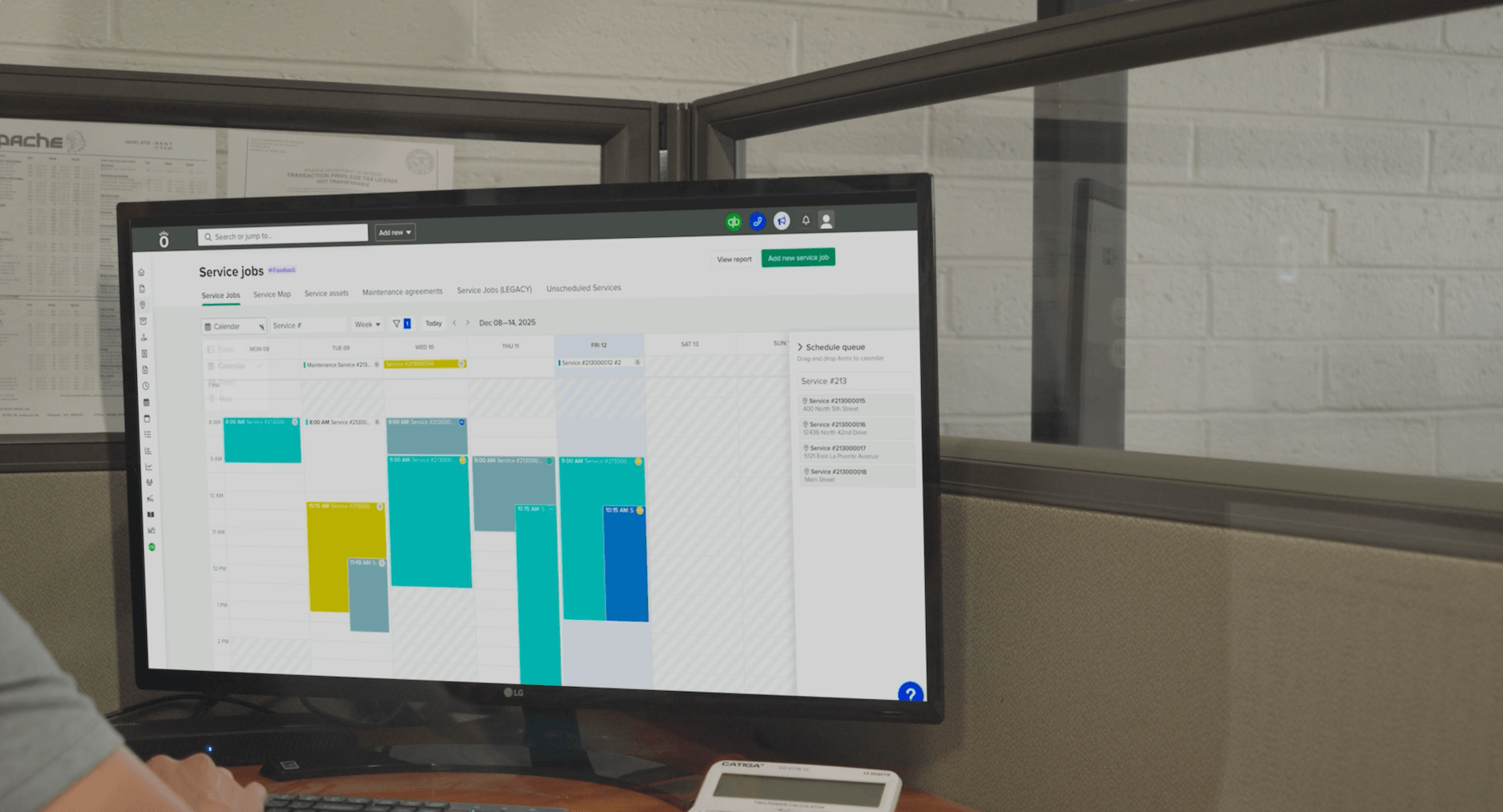
Scheduling isn’t just about people. Trade contractors need to see crews, equipment, and subcontractors in a single view.
A resource board groups your employees by role or department and shows availability at a glance. You can see that your senior electrician is booked on the hospital project through Thursday, that the boom lift is at the strip mall retrofit until Wednesday, and that your plumbing sub is available starting next Monday. No more calling three foremen to figure out where the generator is.
You should be able to schedule equipment like boom lifts, trenchers, excavators, and generators right alongside your crews. When equipment and crew schedules live in the same view, you avoid the overbooking and conflicts that happen when one person manages the crew calendar and someone else tracks equipment on a spreadsheet.
This kind of crew management software gives construction teams one place to check every resource on every job.
Your crews are on job sites, not sitting at desks. If the scheduling tool does not work on their phones, it does not work at all.
Field crews need to see their assignments, get directions to the site, and log progress, all from their phones. The mobile app has to be simple enough that crews adopt it without multiple training seminars. If it takes more than a tap or two to check today’s assignment, people will go back to texting the foreman.
Real-time updates matter. When the office reschedules a crew from one site to another, that change needs to reach the field immediately, not at the end of the day when it’s too late. Daily logs with photos, notes, and weather captured from the job site give project managers visibility without a phone call.
The best crew scheduling app is one your team actually opens every morning.
This is where most construction scheduling software falls short, and where the real money is made or lost.
When your schedule lives in one system and your job costs live in another, you don’t know if a job made money until weeks after it’s done. By then, there’s nothing you can do about it. Scheduled hours should feed directly into labor cost tracking and budget comparisons so you can see, in real time, whether a job is on track financially.
The Mechanical Contractors Association of America (MCAA) identified this connection decades ago. Their Bulletin No. 58 lists 16 factors that impact construction productivity, and several are direct scheduling decisions, including “Reassignment of Manpower” and “Crew Size Efficiency.” Every time you shuffle a crew between jobs or run a team that’s too large or too small for the work, you’re making a financial decision, whether you realize it or not.
Real-time profitability visibility means you can catch a budget overrun while there’s still time to course-correct. If your scheduled labor on the second-floor rough-in is trending 15% over budget, you can adjust crew sizes, accelerate the timeline, or have a conversation with the GC before the problem compounds.
That’s the gap between scheduling as a logistics exercise and scheduling as a financial tool. The best scheduling software for contractors connects every hour on the schedule to a dollar on the budget, automatically.
Many electrical, plumbing, and HVAC contractors run more than projects. They also handle service calls, maintenance agreements, and emergency repairs. If you run two separate systems, one for projects and one for service, you create scheduling conflicts and data silos that cost you time and money.
A unified system lets you see your full team’s capacity across all work types. Your service manager dispatches techs to callbacks while your project manager assigns crews to job phases, and both work from the same resource board. No double-booking. No confusion about who’s available.
Service dispatching and project scheduling should share the same resource view, the same crew data, and the same financial tracking. When a service tech finishes a call and has two hours open, the service manager can see it and assign a nearby callback without checking a second system.
Not all construction scheduling software is the same, and the differences matter more than most feature comparison charts will tell you. Here’s what to look for when you’re evaluating options.
QuickBooks integration. If your accounting lives in QuickBooks, and for most trade contractors it does, your scheduling tool needs to sync time entries, and costs with your books. No double data entry. Look for real-time, two-way sync that keeps both systems current as your team works.
Trade-specific workflows. Does the software handle phases, change orders, progress billing, and AIA pay apps? Or does it just offer shifts and calendars with a construction-themed landing page? Ask to see how it handles a change order mid-project.
Scalability. You might have 5 crews today and 15 next year. Growth in trade contracting often hides operational problems until volume gets too high to ignore. The tool that works for 5 crews needs to work for 15 without replacing your whole system.
Pricing transparency. Be wary of “contact sales” pricing. Trade contractors need to know the cost upfront before investing time in a demo. Knowify starts at $99 per month, and that kind of clarity helps you budget without a sales conversation.
Onboarding and support. How quickly can your team get up and running? Look for U.S.-based support that understands construction workflows, not a chatbot trained on generic help articles.
Try before you buy. Free trials and demos reveal adoption friction that your sales rep won’t mention. Can your foreman figure out the mobile app in five minutes? Does the scheduling view actually make sense for the way you assign work? You won’t know until your team uses it.
Picture a 20-person electrical contractor managing eight active projects and a dozen service calls in a typical week.
Monday morning. The service manager opens the resource board and dispatches three techs to callbacks from the weekend: a panel replacement, a code violation follow-up, and a commercial tenant finish. Meanwhile, the project manager assigns two crews to the hospital tenant improvement and one crew to a grocery store LED retrofit. Both managers work from the same board. No double-booking, no confusion about who is where.
Out in the field, a crew lead checks the mobile app before starting his truck. He sees his assignment: Phase 3 rough-in at the hospital TI project. Phase details, site address, and notes from the project manager are all right there. He drives to the site and gets to work.
Throughout the week, crews log time against their assigned phases. Those hours feed directly into labor cost tracking. No timesheets passed through the office, no manual data entry into QuickBooks. The costs sync automatically.
On Friday, the owner pulls up the profitability dashboard. She can see, job by job, how scheduled hours compare to budgeted hours. The hospital TI is running slightly over on labor for Phase 3, so she flags it for the project manager to review crew sizing before Phase 4 starts.
This actually happens. UK Electric, a family-owned electrical contractor in Peoria, Arizona, saw a 10% increase in average profit margin and saved 5 hours per week on scheduling and data entry after moving to this kind of integrated approach. They do commercial tenant improvements, LED retrofits, and grocery store remodels. rReal trade contracting work, managed from one platform.
There’s no single “best.” It depends on whether you’re a general contractor or a trade contractor. GCs often need enterprise platforms like Procore. Trade contractors need scheduling tied to phases, service tickets, and job costing, not just a digital calendar. Start with the evaluation criteria above and test-drive the tools that match your workflows.
Start with your project phases and deadlines, then assign crews based on availability, skills, and equipment needs. Use a resource board that shows all your crews, equipment, and subs in one view, not a spreadsheet or group text. Build dependencies between phases so you can see how delays cascade, and tie scheduled work to your budget so you track costs as you go.
Free tools like shared calendars handle basic scheduling, but they lack construction-specific features like phase tracking, job costing integration, and equipment scheduling. Most construction scheduling software offers free trials, and a 14-day trial of a purpose-built tool is a better starting point than a permanent free app with limitations that force workarounds.
Employee scheduling assigns individuals to shifts: who works Monday morning, who covers the weekend. Crew scheduling coordinates teams across job sites, project phases, and equipment, factoring in dependencies between trades, certifications, and project timelines. It’s the difference between staffing a retail store and orchestrating work across eight active construction sites.
Some can, but the depth of integration varies widely. Look for real-time, two-way sync of time sheets that connects scheduled work to time tracking, job costing, and invoicing without double data entry. If your scheduling tool only exports a CSV that you import into QuickBooks manually, that isn’t integration. That’s extra work.
The right crew scheduling software for trade contractors does more than organize your calendar. It connects your schedule to your bottom line, linking every crew assignment to job costs, budgets, and profitability in real time.
Knowify is built specifically for trade contractors. Scheduling, job costing, invoicing, and QuickBooks integration work together in one platform, from proposal to payment. No double data entry. No disconnected systems.
Want to see how it works for your trade business? Request a demo, or start a free 14-day trial, no credit card required.