See why trade contractors choose Knowify
Run projects and service work on one platform, with the deepest QuickBooks sync in construction and real licensed AIA pay apps when you need them.
Knowify is built for trade contractors who run projects and service work with their own crews. Use Service Pro to dispatch techs and schedule maintenance visits. Costs and invoices from every job sync with QuickBooks Online in real time.
Buildertrend is a well-known platform for home builders and remodelers who work closely with homeowners.





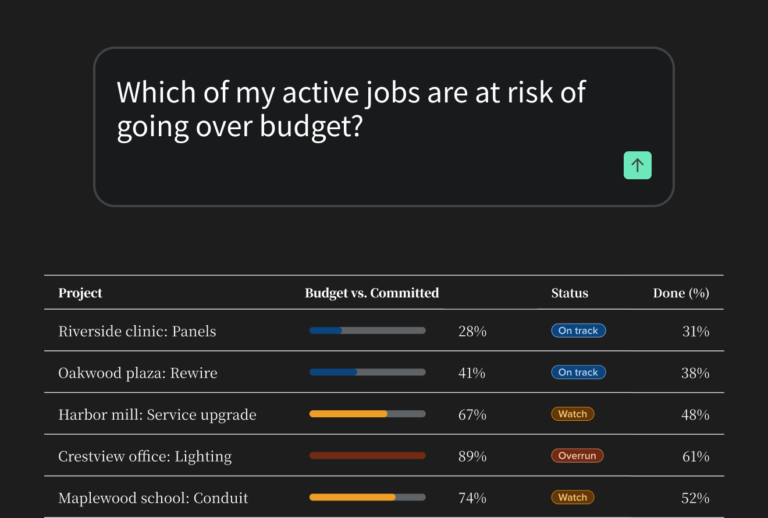
Knowify helps growing trade contractors find jobs that are losing money or underbilled while the work is still going, without running a report. As crews log hours and bills come in, it tracks each phase’s costs against its budget. Real-time WIP shows whether billing has kept up with the work.
Contractors can get the same answers by asking Claude, ChatGPT, or Grok through the AI Connector, part of Knowify AI, which pulls from their own Knowify data. The Knowify Assistant (in beta) looks at labor on past jobs to help them bid the next one more accurately.
Knowify covers contract jobs and service work, with official AIA G702/G703 forms, Service Pro dispatch, and two-way QuickBooks sync.
Pricing starts at $99/month for the Core plan, billed annually, with a 14-day free trial.

Buildertrend is built for home builders, remodelers, and general contractors who manage subs and work closely with homeowners. Its client portal keeps homeowners updated on the job, lets them make selections and track allowances, and gives them a place to file warranty claims after the build. It also handles scheduling and estimating with takeoff.
Buildertrend also offers AIA-style progress invoicing, built-in AI features, and a mobile field app.
Pricing is a custom quote that includes unlimited users and projects.


Knowify fits growing trade contractors who do project and service work and use QuickBooks for their accounting.

Buildertrend is made for builders and is a strong choice for any of these businesses.
If your business centers on homeowners, selections, and subs, go with Buildertrend. Knowify is the better fit when your own crews do the work, service calls come in alongside contract jobs, and your accountant works in QuickBooks.

Knowify and BuildOps are both strong construction management platforms. But they each have clear differences based on their ideal user profile.
Buildertrend’s project tools fit residential builds, with schedules, selections, and a client portal for homeowners. Its Warranty feature handles service after the build. Clients file claims, and the builder schedules repairs with their team or subs.
Knowify runs contract jobs by phase, with change orders tied to the budget and job costing on each phase. Service Pro handles dispatch, maintenance agreements that schedule repeat visits, equipment history on the tech’s phone, and payment in the field.
Knowify tracks costs, invoices, and profit for contract jobs and service calls in the same reports and syncs all of it to QuickBooks. You can check last month’s profit across every job, service calls included, without matching a service app’s reports against your project software.
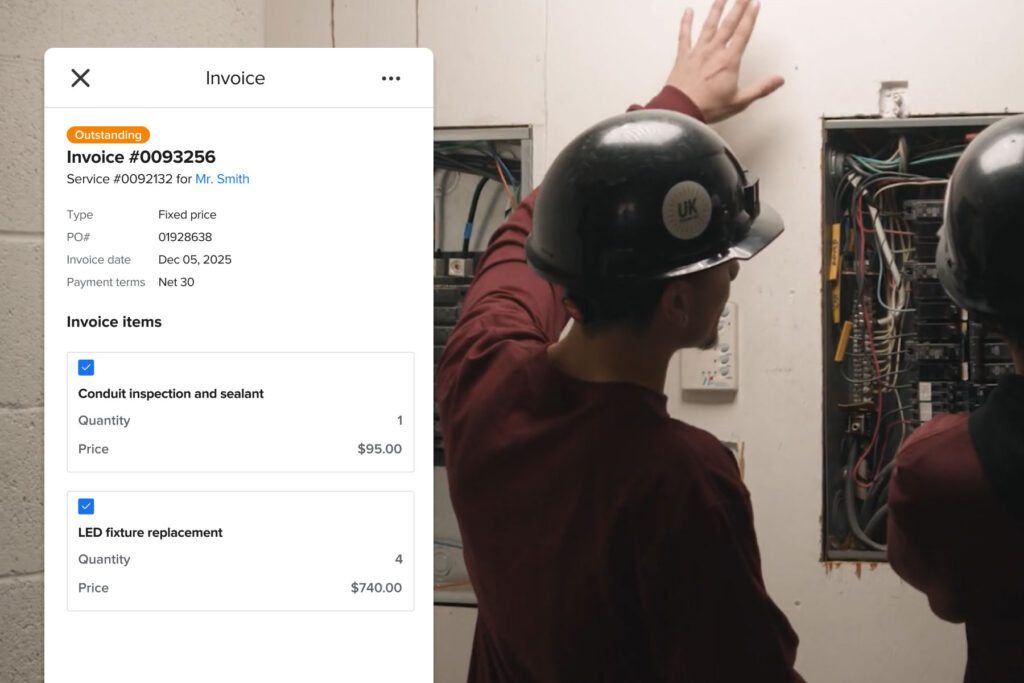
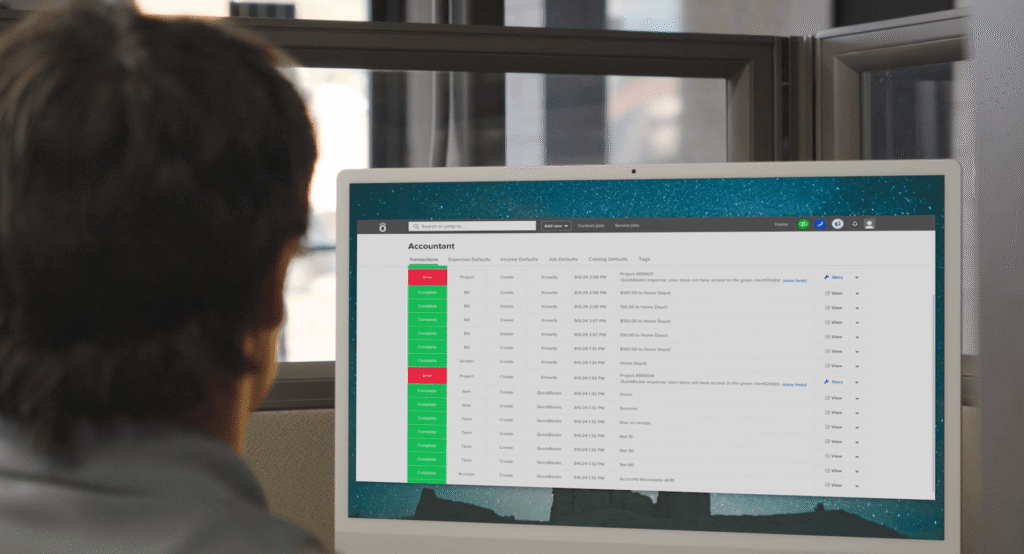
Both Buildertrend and Knowify connect to QuickBooks Online, QuickBooks Desktop, and Intuit Enterprise Suite. In Knowify, the Desktop and Intuit Enterprise Suite connections come with the Enterprise plan.
Knowify’s QuickBooks Online sync runs both ways in real time for clients, vendors, subs, expenses, bills, bill payments, invoice payments, and projects. Invoices and employee time go one way: from Knowify to QuickBooks.
Knowify also connects directly to QuickBooks Payments, Time, and Online Payroll.
Buildertrend runs payments through Buildertrend Payments and sends time from its own time clock to QuickBooks.
Buildertrend’s AI is built into its app and handles admin. Bill Capture reads bills and receipts, Client Updates drafts client messages, and AI Submittals and AI Plans organize submittals and plan sets.
Knowify AI helps trade contractors understand their margins and catch profit leaks. It tracks spending against the budget while jobs run and catches scope creep and unbilled work before they cost money.
It draws on more than a decade of managing trade work, from AIA billing to prevailing wage and WIP, and learns from each contractor’s own jobs.
Today, contractors use Knowify’s AI Connector to ask Claude, ChatGPT, or another MCP-compatible AI tool questions like “What’s my WIP?” or “What jobs are underbilled?” The answers come from their own Knowify job data.
The Knowify Assistant (in beta) is an embedded chat agent that analyzes your jobs and flags what’s eating into your margins, from budgets running over to work you haven’t billed yet. It also does the work for you. Give it a target margin, and it builds the bid, sets up the job’s budget, and schedules every phase with your crew and subs.
We knew years ago that we needed some sort of business software because I need to be able to run one-day service jobs, and projects that take up to a year. No one had the list of features I needed, except Knowify.
“Knowify is the main reason we’ve grown so much in the last few years. As the owner, it easily saves me 20 to 40 hours a week vs. what I was doing on paper before.”
“Knowify is a comprehensive software that allows us, from the time we complete our takeoff to the time we complete the job, to use one software to run our projects and see how we’re performing in real time.”
“Using Knowify + Claude is already saving us 10 hours a week in admin work. That’s $15,000 to $20,000 a year.”
Run projects and service work on one platform, with the deepest QuickBooks sync in construction and real licensed AIA pay apps when you need them.
Plans start at $99/month (Core, billed annually; $149 monthly) and include one user, with additional users at $29/month.
Advanced is $329/month (billed annually, includes 10 users; $399 monthly) and adds job costing, project planning, and real-time WIP. Service dispatch is a $99/month add-on (Service Pro). Enterprise is quote-based.

Buildertrend doesn’t publish its prices. You answer four questions on its pricing page, then get a custom quote on a call with its team.
Every quote includes unlimited users and unlimited projects.
To understand which fits your team best, compare the two tools on fit, not price.
Buildertrend suits builders whose customers are homeowners. Knowify suits trade contractors who use QuickBooks and run both projects and service work.
Yes, for trade contractors who run projects and service work and use QuickBooks for accounting. Knowify handles both kinds of work in one system, with real-time job costing and official AIA forms for commercial billing.
Buildertrend is an excellent choice for builders and remodelers whose clients are homeowners.
Knowify is built for trade contractors and Buildertrend for home builders and remodelers.
With Knowify, you get Service Pro for service work, the deepest QuickBooks sync in construction, official AIA forms, and published pricing.
Buildertrend gives you a client portal, selections, warranty claims, and unlimited users on a custom quote.
Yes, Buildertrend handles service after the build through its Warranty feature. The builder assigns each homeowner’s claim to their own crew or a sub.
Knowify runs day-to-day service calls through Service Pro, with dispatch, maintenance agreements, and equipment history your techs can pull up on their phones.
Both sync with QuickBooks Online in both directions. Knowify’s QuickBooks sync runs in real time and covers most records, from bills and expenses to invoice payments and projects.
Knowify also has native integrations with QuickBooks Payments, Time, and Online Payroll. Buildertrend handles payments and time tracking with its own tools.
Yes, Buildertrend added AIA-style progress invoicing with a schedule of values and retainage in September 2026.
Knowify builds pay apps on the official AIA G702/G703 forms through its partnership with AIA Contract Documents. Some GCs and owners require those official forms on commercial jobs.
If your work never calls for AIA pay apps, this won’t matter.
Yes, both have AI, but they do different things. Buildertrend’s AI handles paperwork, like capturing bills, drafting client updates, and organizing submittals and plans.
Knowify AI is built to help contractors find profit leaks. You can use it today through the AI Connector in Claude or ChatGPT. The Knowify Assistant is in beta.
Knowify publishes its pricing, starting at $99/month for the Core plan when billed annually, with a 14-day free trial.
Buildertrend’s custom quote comes after a call and includes unlimited users and projects.
Home builders and remodelers who manage homeowner selections and warranty claims through a client portal. Buildertrend also suits GCs who hire subs for most of the work on each job.
Trade contractors with their own crews get the most from Knowify, especially shops that take service calls alongside projects, do their accounting in QuickBooks, or bill commercial work on official AIA forms.