
See why trade contractors choose Knowify
Run your service calls and your construction projects on one platform, with job costing, real-time WIP, and the deepest QuickBooks sync in construction.
Jobber is built for residential service work. Knowify runs your service dispatch and your construction projects on one platform, with job costing, real-time WIP, and the deepest QuickBooks sync in the trades. So the contractor who does both doesn’t have to buy a second tool the day a commercial job lands.





Knowify is built for growing trade contractors who run both service work and construction projects, residential or commercial, on one platform. You bid, run, and invoice every job type in one place, backed by the deepest QuickBooks integration on the market.
Jobber is built for residential, consumer-facing service businesses like HVAC, plumbing, electrical service, cleaning, and lawn care. It’s very good at reactive and recurring service: online booking, a polished customer experience, a 24/7 AI receptionist, and built-in reviews and referrals. It doesn’t do construction project management, job costing by phase, or AIA billing.


Knowify fits growing trade contractors who’ve outgrown spreadsheets or a service-only tool but don’t want an enterprise rollout. It’s the right call when you run more than one kind of work.

Jobber is built for residential, consumer-facing service businesses, and it’s very good at it. If you run reactive and recurring service and win on customer experience and marketing, Jobber is purpose-built for you, and it does things Knowify doesn’t.
Jobber is the right call if you run pure residential service and compete on customer experience. It’s more polished on the consumer side and cheaper to start. But most growing trade contractors don’t stay purely in service. The first time you take on a construction project or a commercial job, Jobber can’t help, and Knowify can, without giving up your service work.

Knowify and Jobber are both strong construction management platforms. But they each have clear differences based on their ideal user profile.
Most service tools make you pick a lane. Jobber is built for residential service: reactive calls, recurring visits, quotes, and invoices. Knowify runs that service work and your construction projects, so the same system handles a one-day service call and a months-long commercial job.
That matters because most growing contractors don’t stay in one lane. You might run service today and take on a build-out next quarter, or run both with the same crews. Knowify was built for that mix. You bid, run, and invoice every job type in one place, with one set of numbers.
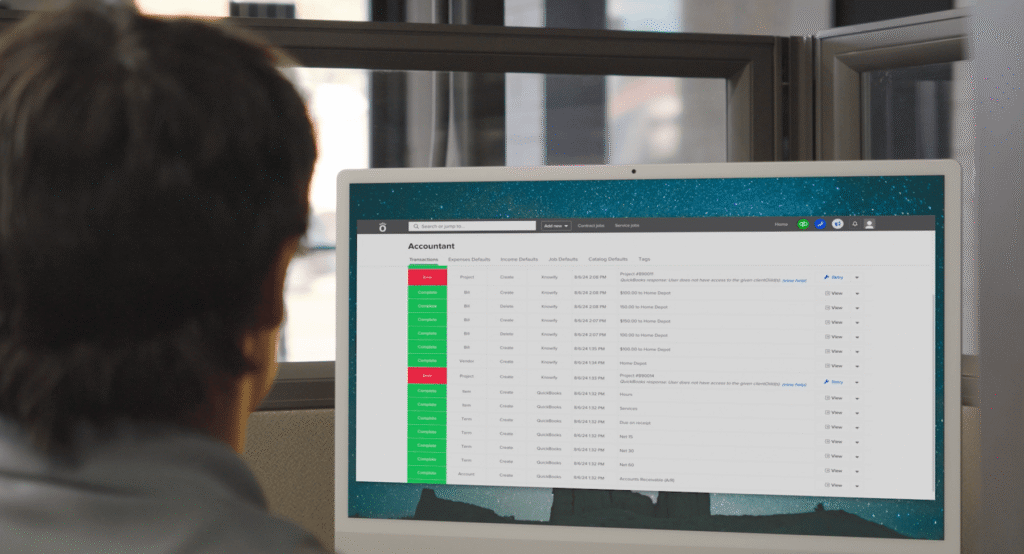
Both tools connect to QuickBooks. The difference is how far it goes. Jobber offers a standard QuickBooks Online sync for clients, invoices, and payments. Knowify is the official QuickBooks Online construction partner, with a real-time, two-way sync, so you and your bookkeeper work in either system and see the same numbers.
The depth runs across the whole Intuit stack. Knowify syncs natively with QuickBooks Online and Desktop, QuickBooks Payments, QuickBooks Time, QuickBooks Online Payroll, and the Intuit Enterprise Suite. On a project, it also syncs the things a standard sync can’t, like retainage and pay-app data, back into your books.
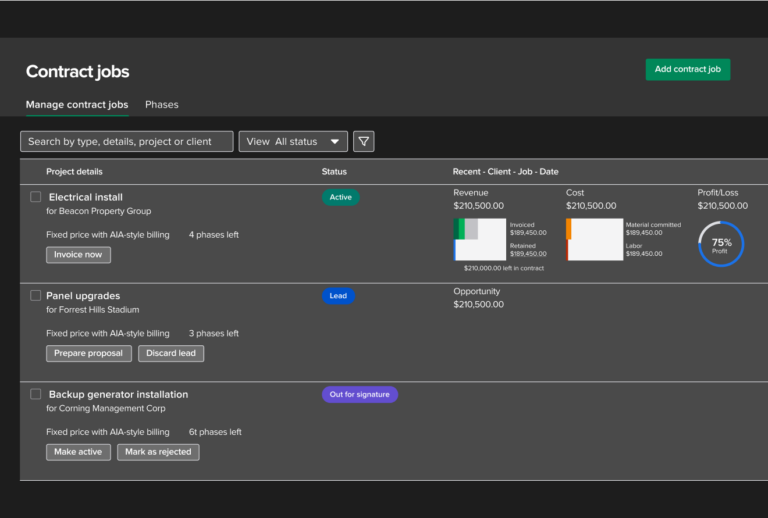
Service invoicing is one thing. Knowing whether a job is making money is another, and it’s where a service-only tool runs out of room. Jobber reports revenue and expense per job. Knowify tracks cost by phase and cost category as the work happens, so you see budget versus actual and real-time WIP before you send the next invoice, not after the job closes.
For contractors who bill commercial or public work, Knowify also does the parts a service tool skips: progress billing on a schedule of values, change orders reconciled into the right cycle, and real licensed G702/G703 AIA pay apps. If you never touch that kind of work, you won’t miss it. If you do, it’s the difference between one platform and a spreadsheet on the side.
We knew years ago that we needed some sort of business software because I need to be able to run one-day service jobs, and projects that take up to a year. No one had the list of features I needed, except Knowify.
“Knowify is the main reason we’ve grown so much in the last few years. As the owner, it easily saves me 20 to 40 hours a week vs. what I was doing on paper before.”
“Knowify is a comprehensive software that allows us, from the time we complete our takeoff to the time we complete the job, to use one software to run our projects and see how we’re performing in real time.”
“Using Knowify + Claude is already saving us 10 hours a week in admin work. That’s $15,000 to $20,000 a year.”
Run your service calls and your construction projects on one platform, with job costing, real-time WIP, and the deepest QuickBooks sync in construction.
Knowify publishes its pricing. Plans start at $99/month (Core, billed annually; $149 monthly) and include one user, with additional users at $29/month. Advanced is $329/month (billed annually, includes 10 users; $399 monthly) and adds job costing, project planning, and real-time WIP. Service dispatch is a $99/month add-on (Service Pro). Enterprise is quote-based. Every plan includes a 14-day free trial, no contract, and no implementation fee.
Jobber also publishes pricing and starts lower for solo operators. Individual plans run Core $39, Connect $119, and Grow $199 per month; team plans run Connect Team $169 (5 users), Grow Team $349 (10 users), and Plus $599 (15 users), plus $29 per user above the caps. Service add-ons include the AI Receptionist at $99/month and the Marketing Suite at $79/month. Jobber includes a 14-day free trial.
One honest note: for a solo service operator, Jobber is cheaper to start. Knowify is priced for the contractor who needs construction financials and service work in one place, where the real comparison is one platform against two separate tools and two separate QuickBooks syncs.

Yes, if you run construction projects alongside or instead of service work. Jobber is excellent for pure residential service. Knowify adds construction project management, job costing, and WIP while still handling service dispatch. If you’re purely residential service with no project work, Jobber may fit you better.
Jobber is built for residential field service: dispatch, quoting, invoicing, online booking, a 24/7 AI receptionist, and built-in marketing, with no construction capability. Knowify runs both service and construction projects, does job costing and WIP, has the deepest native QuickBooks integration in construction, and for commercial work generates real AIA pay apps.
Yes, through the Service Pro add-on: real-time dispatching, scheduling, a mobile app, recurring maintenance agreements, a service portal, and payments. To be fair to Jobber, its consumer-facing booking experience is more polished, and its 24/7 AI Receptionist and built-in marketing suite are things Knowify doesn’t offer.
No. Jobber has no phase-based project management, no job costing by phase, no progress billing, no retainage, and no subcontractor management. That’s the clearest line between the two.
Both publish pricing and both offer a 14-day trial. Jobber starts lower for a solo operator at $39/month. Knowify starts at $99/month and is priced for contractors who need construction financials and service in one platform, often replacing a two-tool stack.
Knowify is the official QuickBooks Online construction partner, with a real-time two-way sync across QuickBooks Online and Desktop, QuickBooks Payments, QuickBooks Time, QuickBooks Online Payroll, and the Intuit Enterprise Suite, including retainage and pay-app data. Jobber offers a standard QuickBooks Online sync for clients, invoices, and payments.
Both have AI, but they point in different directions. Knowify’s AI Connector is open: it brings your live job data into Claude and ChatGPT, so you can ask “what’s my WIP?” or “which jobs are underbilled?” and get answers from your actual numbers. Jobber’s AI is broader on the service side, with an in-app Copilot and a 24/7 AI Receptionist that answers calls and books jobs, which Knowify doesn’t offer.
Yes, for contractors who bill commercial or public work. Knowify generates real licensed G702/G703 pay apps with a schedule of values, retainage, and change-order reconciliation. Jobber doesn’t do AIA billing. If you never bill that way it won’t matter; if you do, it’s a hard requirement Jobber can’t meet.
Pure residential service businesses that compete on customer experience and marketing, want the lowest entry price, or need 24/7 AI call answering, with no construction or commercial contract work.
Growing trade contractors who run both service and construction, anyone who needs real job costing and WIP, QuickBooks-committed shops that want a deep native sync, and contractors who bill commercial or AIA work.